310 Dream Catcher Coloring Pages - KDP
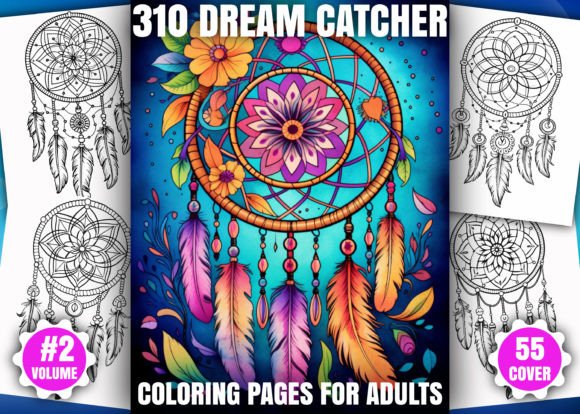
If you're exploring creative assets for adult coloring books—or building a high-content KDP business—the 310 Dream Catcher Coloring Pages - KDP collection stands out not just for its volume, but for how thoughtfully it bridges artistic depth with publishing practicality. This isn’t a generic clipart bundle hastily assembled for quick resale. It’s a purpose-built resource: 310 original, hand-crafted dream catcher line art designs—each sized precisely at 8.5″ × 11″, rendered in crisp 300dpi black-and-white, and delivered in multiple professional formats (PDF, JPG, PNG). Whether you’re an illustrator refining your portfolio, a small business owner launching your first Amazon KDP title, or an educator sourcing calming, culturally resonant activities, this collection offers real flexibility—if used with intention.
What People Often Misunderstand About This Bundle
Many buyers assume “310 pages” means plug-and-play readiness for immediate upload to KDP. That’s only half true. While the files are print-ready, the structure of your final book matters just as much as the artwork. A common oversight is treating all 310 pages as interchangeable interior content—without considering flow, pacing, or visual hierarchy. Dream catchers vary widely: some feature dense featherwork and layered webbing; others emphasize open negative space or minimalist symmetry. Throwing them together without curation can lead to reader fatigue, inconsistent page turns, or unintentional repetition that undermines perceived value.
Another frequent misstep? Overlooking format compatibility beyond resolution. Yes, every file is 300dpi—but if you’re using the PNGs directly in a Canva-based KDP interior, transparency layers may cause unexpected white borders or alignment shifts during PDF export. Likewise, assuming the included 55 cover PNGs are “KDP-optimized” without checking bleed margins or safe-zone text placement can trigger Amazon’s automated pre-flight checks—and delay your launch.
Why These Oversights Hurt More Than You Think
When interior pages lack rhythm—say, jumping from ultra-detailed mandala-style webs to sparse single-hoop sketches—the perceived quality drops. Readers notice inconsistency, even if they can’t name why. That affects reviews, repeat purchases, and organic discoverability on Amazon. Similarly, uploading a cover with text too close to the edge risks cropping during printing, making your branding unreadable. Worse, if you’ve already invested in ads or email campaigns promoting a specific cover design, re-uploading delays break momentum and dilute trust.
There’s also a subtle cost trap: assuming the JPG/PNG files eliminate the need for layout software. While you *can* assemble interiors in free tools, doing so without understanding KDP’s spine width calculations, gutter allowances, or grayscale conversion behavior often leads to costly proofing rounds—or worse, live listings with faint lines, misaligned centering, or unintended halftone artifacts.
How to Use This Collection Wisely—Not Just Quickly
Start by sorting the 310 pages into intentional categories—not just “easy” vs. “hard,” but by visual weight, theme resonance, and structural variety. Group pages with intricate feathers and beads together; cluster those with geometric web patterns separately; isolate ones featuring nature motifs (owls, moons, pine boughs) for thematic chapters. This approach creates natural progression—ideal for multi-volume series or themed sub-brands.
Before assembling your PDF interior, test one spread in KDP’s online previewer. Import two facing pages (left/right) and zoom to actual size. Check for: consistent line thickness across both pages, centered composition, and adequate margin clearance—especially near the binding edge. If any design feels cramped or off-center, use your editing software to nudge it—not crop it. Preserving full 8.5″ × 11″ integrity ensures clean printing and avoids accidental truncation.
For covers, treat the 55 PNGs as raw assets—not finished products. Open one in Photoshop or Affinity Designer, add your title in a legible serif or clean sans-serif font, and extend background elements 0.125″ into the bleed zone. Keep critical text and logos within the 0.25″ safe area. Then export as CMYK PDF/X-1a—not RGB PNG—to meet KDP’s press requirements without color-shifting surprises.
What to Verify Before Purchase or Upload
- File naming convention: Are JPGs and PNGs numerically sequenced (e.g., DC_001.jpg, DC_001.png)? Consistent naming saves hours when batch-importing into InDesign or Vellum.
- Line art clarity at 100% zoom: Open a few random JPGs at native size. Do thin lines remain sharp—not pixelated or fuzzy? Blurry edges won’t recover in print, no matter the DPI claim.
- Cover PNG transparency: Drop one into a white document. Does the background vanish cleanly—or leave a faint gray halo? Clean transparency = easier compositing.
- Commercial license scope: Confirm the license permits derivative works (e.g., adding quotes, textures, or watermarks) and unlimited KDP uploads—no per-title fees or attribution requirements.
A Realistic Example: From Bundle to Published Book
Sarah, a freelance graphic designer and part-time KDP publisher, downloaded the 310 Dream Catcher Coloring Pages - KDP bundle to launch her second coloring book. Instead of uploading all 310 pages, she selected 96—grouped into four chapters (“Feather & Flow,” “Sacred Geometry,” “Lunar Webs,” and “Nature’s Circle”). She added subtle, non-distracting quote callouts in Garamond (size 10pt, light gray), placed well within margins. For her cover, she layered one of the 55 PNGs over a textured parchment background, adjusted contrast for richness, and exported as PDF/X-1a. Her book went live in 48 hours—with zero formatting rejections—and earned 17 five-star reviews in its first week, many praising “the thoughtful pacing” and “clean, confident lines.”
Her advantage wasn’t just the asset quality—it was her attention to *how* those assets function within Amazon’s ecosystem. That’s the difference between a bundle you own and one you truly use.
Final Thought: Depth Over Quantity
The real value of the 310 Dream Catcher Coloring Pages - KDP collection lies not in hitting a number—but in having enough variation to build something distinctive. You don’t need all 310 pages in one book. You need the right 48, curated with care, tested for print fidelity, and framed by smart cover and interior design. When you do that, what begins as a digital download becomes a trusted, scalable creative foundation—one that serves readers deeply and grows your credibility quietly, steadily, and authentically.