Kids Notebook Paper Bundle Canva KDP
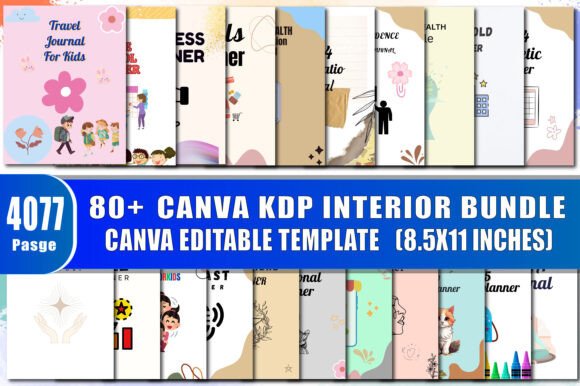
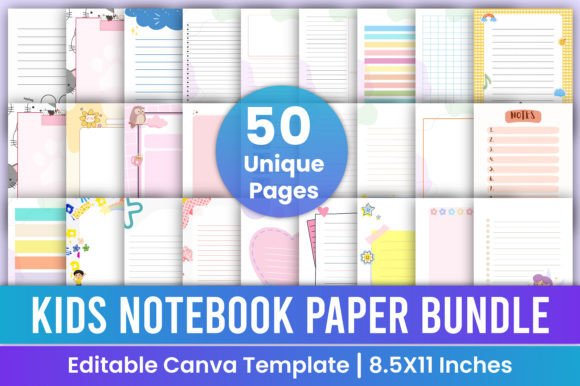
Imagine launching a new line of children’s notebooks in under an hour—no design degree required, no expensive software, and zero waiting for print proofs. That’s the real advantage of the Kids Notebook Paper Bundle Canva KDP: 50 professionally crafted, fully editable notebook interiors designed specifically for creators who want speed, flexibility, and quality—without compromise.
This isn’t just another collection of clipart-heavy pages. Every template is built with intention: clean typography, age-appropriate spacing, thoughtful margins, and consistent CMYK color profiles optimized for professional printing at 300 DPI. The trim size is standard 8.5 × 11 inches—ideal for KDP paperback uploads—and every file arrives ready to use: editable Canva links, high-resolution PDFs (print-ready), plus JPG and PNG versions for quick previews or hybrid projects.
Why This Bundle Fits Real Creative Workflows
Creators don’t need more tools—they need fewer bottlenecks. With this bundle, you skip the blank-canvas paralysis. Instead of starting from scratch each time, you’re working from a library of tested, classroom- and parent-approved layouts: dotted grids for early writers, wide-ruled lines with dashed midlines for letter formation, illustrated borders that spark imagination without overwhelming focus, and themed headers (“My Science Journal,” “Adventure Logbook”) that support learning goals.
Because everything lives in Canva, editing is intuitive—not technical. Change fonts in one click. Swap colors to match your brand palette. Resize elements to fit custom dimensions (like 6×9 for mini journals or A5 for European markets). Add your logo or store name to the cover page. Duplicate a favorite interior and adapt it for a new theme—say, turning a “Space Explorer” page into a “Deep Sea Diver” version by swapping icons and adjusting labels.
Who Uses This—and How They Get Results
Educators and homeschoolers use these templates to build differentiated student workbooks—customized for reading levels, IEP accommodations, or subject-specific note-taking. One teacher prints laminated versions for reusable dry-erase practice; another compiles digital versions into Google Classroom assignments with embedded voice notes.
Small publishers and KDP entrepreneurs scale faster by rotating themes seasonally: back-to-school bundles in August, summer activity packs in May, holiday-themed journaling kits in November. With 50 distinct interiors, you can launch multiple SKUs without redesigning from zero—just tweak colors, rename titles, and update cover art.
Freelance designers and stationery brands treat this as a production accelerator. They import the Canva links into client projects, adjust branding elements, and deliver polished PDFs within 24 hours—freeing up time to focus on strategy, client communication, or developing original illustrations.
Hobbyists and makers turn these into personalized gifts: fill a notebook with a child’s favorite animals, add their name to each page header, and print locally for birthdays or school events. No inventory risk. No minimum orders. Just meaningful, handmade-feeling results—on demand.
Practical Tips for Consistent, Audience-Friendly Output
Clarity starts before you open Canva. Before editing, ask: Who holds this notebook? What do they need to do with it? A 5-year-old tracing letters needs generous line height and visual cues. A 10-year-old tracking weekly reading goals benefits from checkboxes, progress bars, and space for short reflections—not decorative flourishes that distract.
When adapting templates, keep consistency across your product line. Use the same font family across all interiors. Maintain uniform margin widths so printed pages align cleanly when bound. Stick to one primary accent color per theme—this helps children recognize related notebooks at a glance and builds brand recognition if you’re selling multiple sets.
For KDP success, double-check bleed and safety margins in your final PDF—even though the templates are pre-set, always preview using Amazon’s online previewer. Export as CMYK (not RGB) and verify resolution stays at 300 DPI. If adding custom cover art, ensure it matches the interior’s tone—playful but not chaotic, structured but not sterile.
Creative Variations You Can Build From One Template
Don’t limit yourself to static notebooks. These pages are springboards:
- Digital learning tools: Convert a lined journal page into an interactive Notability or GoodNotes template—add hyperlinked tabs or audio recording prompts.
- Classroom posters: Enlarge a single page design to 24×36 inches, laminate it, and hang it as a writing anchor chart.
- Print-on-demand stickers: Isolate fun icons or borders from the PNG files and upload them to sticker services like Sticker Mule.
- Subscription box inserts: Mix and match 5–7 interior styles per month, pairing them with themed pencils or erasers.
- Therapy or OT resources: Adapt handwriting pages with sensory cues (e.g., textured line patterns or weighted bottom borders) for fine motor support.
You’re not buying 50 pages—you’re acquiring 50 starting points for iteration, testing, and audience feedback. Try one layout with your first batch. See which themes get shared most on Pinterest. Which line styles generate the most reviews mentioning “easy to write on.” Then double down—not on volume, but on what resonates.
If you value clean execution over creative chaos—if you want to ship real products, not just ideas—the Kids Notebook Paper Bundle Canva KDP delivers exactly that: structure that supports creativity, not replaces it. It’s the quiet foundation behind confident launches, repeat customers, and sustainable growth.
If you found this useful, explore more thoughtfully designed templates in the store—and follow for updates on seasonal releases, educator-focused variants, and KDP optimization guides. Your next best-selling notebook starts here.